r.colors.qml
Applies GRASS raster colors and category labels from a QGIS .qml style file. Supports paletted and singleband pseudocolor renderers.
r.colors.qml [-clnd] map=name qml=name [separator=character] [default_color=name] [null_value=float] [--verbose] [--quiet] [--qq] [--ui]
Example:
r.colors.qml map=name qml=name
grass.tools.Tools.r_colors_qml(map, qml, separator="tab", default_color="255:255:255", null_value=None, flags=None, verbose=None, quiet=None, superquiet=None)
Example:
tools = Tools()
tools.r_colors_qml(map="name", qml="name")
This grass.tools API is experimental in version 8.5 and expected to be stable in version 8.6.
grass.script.run_command("r.colors.qml", map, qml, separator="tab", default_color="255:255:255", null_value=None, flags=None, verbose=None, quiet=None, superquiet=None)
Example:
gs.run_command("r.colors.qml", map="name", qml="name")
Parameters
map=name [required]
Raster map to style
qml=name [required]
Input QGIS .qml style file
separator=character
Field separator
Field separator for category rules
Default: tab
default_color=name
Color
Default color (used for out-of-range values when clip is enabled)
Default: 255:255:255
null_value=float
Value(s) to set to NULL
-c
Apply colors only
-l
Apply labels only
-n
Only print color and category rules to stdout
-d
For singlebandpseudocolor, force discrete (stepped) color rules
--help
Print usage summary
--verbose
Verbose module output
--quiet
Quiet module output
--qq
Very quiet module output
--ui
Force launching GUI dialog
map : str | np.ndarray, required
Raster map to style
Used as: input, raster, name
qml : str, required
Input QGIS .qml style file
Used as: input, file, name
separator : str, optional
Field separator
Field separator for category rules
Used as: input, separator, character
Default: tab
default_color : str, optional
Color
Default color (used for out-of-range values when clip is enabled)
Used as: input, color, name
Default: 255:255:255
null_value : float, optional
Value(s) to set to NULL
flags : str, optional
Allowed values: c, l, n, d
c
Apply colors only
l
Apply labels only
n
Only print color and category rules to stdout
d
For singlebandpseudocolor, force discrete (stepped) color rules
verbose : bool, optional
Verbose module output
Default: None
quiet : bool, optional
Quiet module output
Default: None
superquiet : bool, optional
Very quiet module output
Default: None
Returns:
result : grass.tools.support.ToolResult | None
If the tool produces text as standard output, a ToolResult object will be returned. Otherwise, None will be returned.
Raises:
grass.tools.ToolError: When the tool ended with an error.
map : str, required
Raster map to style
Used as: input, raster, name
qml : str, required
Input QGIS .qml style file
Used as: input, file, name
separator : str, optional
Field separator
Field separator for category rules
Used as: input, separator, character
Default: tab
default_color : str, optional
Color
Default color (used for out-of-range values when clip is enabled)
Used as: input, color, name
Default: 255:255:255
null_value : float, optional
Value(s) to set to NULL
flags : str, optional
Allowed values: c, l, n, d
c
Apply colors only
l
Apply labels only
n
Only print color and category rules to stdout
d
For singlebandpseudocolor, force discrete (stepped) color rules
verbose : bool, optional
Verbose module output
Default: None
quiet : bool, optional
Quiet module output
Default: None
superquiet : bool, optional
Very quiet module output
Default: None
DESCRIPTION
r.colors.qml applies raster symbology defined in QGIS in a QML style file to the same raster in GRASS. The user provides the QML style file and the raster to which to apply the symbology (color and labels) from that file.
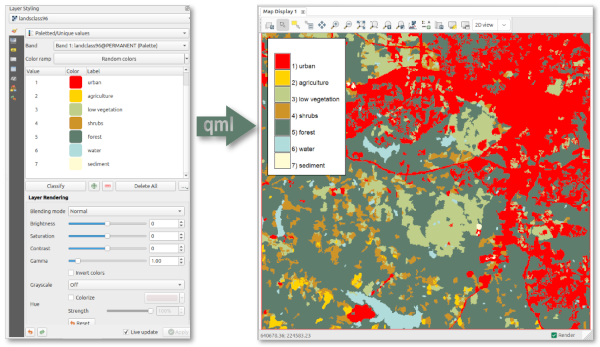
QML is a format for storing layer styling in QGIS, including the colors and labels that are defined under symbology. The addon extracts the raster colors and the raster labels and uses these to construct the color table and raster categories in GRASS.
Singleband Pseudocolor
- Continuous (Interpolated): Generates a smooth color gradient.
- Discrete: QGIS discrete classes are translated into GRASS "step" rules by duplicating boundary values, creating hard color transitions without gradients.
- Forced Discrete: Users can force a continuous QGIS ramp to be interpreted as discrete steps using the -d flag.
Paletted (Unique Values)
Treated as an exact mapping. Each unique value in the palette is assigned its specific color and label. Other colors are assigned the default color (white or user-defined).
Range and Clipping Behavior
The effective range is determined by the minimum and maximum values defined in the QGIS settings. If undefined, the lowest and highest values found in the color ramp items are used.
By default, for raster values outside the effective range, the color ramp is extended to infinity. I.e., values below the defined minimum inherit the start color, and values above the defined maximum inherit the end color. If clipping is enabled, values outside the effective range are assigned the default color (default: white).
NOTE
Transparency is silently ignored, as this is not supported by GRASS.
There are many different ways to style a raster in QGIS, and not all combinations have been checked. In case a QML file does not result in the expected styling in GRASS, carefully check your settings first.
Text labels defined in the QGIS symbology are extracted and applied using r.category. Any characters in the label that match the output field separator are replaced with a space.
EXAMPLES
Apply both colors and labels defined in the landclass96.qml file to the raster layer landclass96 in GRASS.
r.colors.qml map=landclass96 qml=landclass96.qml
SEE ALSO
AUTHOR
Paulo van Breugel, HAS green academy, Innovative Biomonitoring research group, Climate-robust Landscapes research group
SOURCE CODE
Available at: r.colors.qml source code
(history)
Latest change: Saturday Jan 17 19:11:52 2026 in commit f9e94e9