Note: This document is for an older version of GRASS GIS that has been discontinued. You should upgrade, and read the current manual page.

NAME
r.colors.toqml - Exports GRASS raster colors and category labels to a QGIS .qml style file. Optionally exports the raster to GeoTIFF with the same basename.KEYWORDS
raster, color table, category, QGISSYNOPSIS
Flags:
- -r
- Export raster as GeoTIFF
- Export the raster to GeoTIFF with the same basename as the QML
- -d
- Force discrete/paletted style
- For CELL: force 'Paletted' (unique values) even if no categories exist. For FCELL/DCELL: force 'SinglebandPseudocolor' with DISCRETE interpolation (bins).
- -c
- Force continuous/linear style
- Force 'SinglebandPseudocolor' with LINEAR interpolation. If CELL map has categories, they are ignored.
- --overwrite
- Allow output files to overwrite existing files
- --help
- Print usage summary
- --verbose
- Verbose module output
- --quiet
- Quiet module output
- --ui
- Force launching GUI dialog
Parameters:
- map=name [required]
- Input GRASS raster map
- output=name [required]
- Output QGIS .qml style file
Table of contents
DESCRIPTION
r.colors.toqml exports raster symbology defined in GRASS GIS to a QGIS QML style file. The addon reads the GRASS raster color table and, where applicable, raster category labels, and writes a QML file that can be used to style the raster in QGIS.Optionally, the raster itself can be exported simultaneously to GeoTIFF, using the same basename as the QML file. As long as the two files are kept in the same folder, opening the GeoTIFF in QGIS will automatically apply the style.
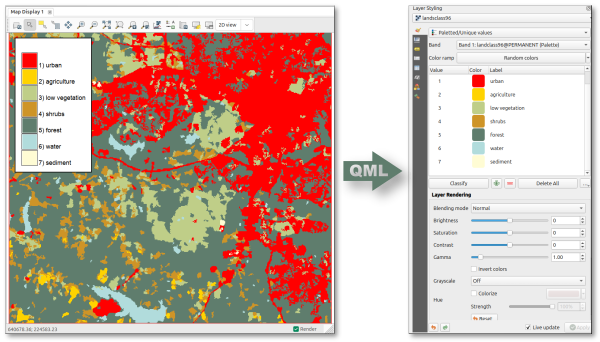
From GRASS through QML to QGIS raster symbology.
The addon supports Categorical rasters (CELL with categories), exported as paletted QGIS renderers, and Continuous rasters (FCELL/DCELL), exported as singleband pseudocolor renderers with interpolated or discrete color ramps.
For categorical rasters, only categories actually present in the current computational region and MASK are included in the QML file.
NOTE
Percentage-based color rules are not supported and cause the module to fail. such rules are relative to the raster range in GRASS and cannot be faithfully represented in a QGIS QML style, which requires absolute numeric breakpoints.KNOWN ISSUES
Continuous range vs. breakpoints: for continuous rasters, the QML range is derived from the numeric color-rule breakpoints. If the raster range in a given region is narrower than the color table domain, QGIS will still show the full ramp domain defined by the breakpoints.Category subset in current region: for categorical rasters, the exported palette is filtered to categories present in the current region/MASK. If you want a palette for the full raster extent, set the computational region to the full raster before running the module.
EXAMPLES
Export the color table and category labels of a categorical raster to a QML file:
r.colors.toqml map=landclass96 output=landclass96.qml
Export a continuous raster color table to QML and export the corresponding raster to GeoTIFF:
r.colors.toqml -r map=cfactor output=cfactor.qml
Force a discrete color ramp for a continuous raster:
r.colors.toqml -r map=cfactor output=cfactor.qml discrete=yes
SEE ALSO
r.colors.outAUTHOR
Paulo van Breugel,HAS green academy, Innovative Biomonitoring research group, Climate-robust Landscapes research groupSOURCE CODE
Available at: r.colors.toqml source code (history)
Latest change: Monday Jan 19 23:04:27 2026 in commit: 619af32fc64428e3548aedba6eee30397693435e
Main index | Raster index | Topics index | Keywords index | Graphical index | Full index
© 2003-2025 GRASS Development Team, GRASS GIS 8.4.3dev Reference Manual