i.hyper.import
Hyperspectral imagery import.
i.hyper.import [-pu] input=name product=string [output=name] [composites=string [,string,...]] [composites_custom=string] [strength=integer] [--overwrite] [--verbose] [--quiet] [--qq] [--ui]
Example:
i.hyper.import input=name product=prisma
grass.tools.Tools.i_hyper_import(input, product="prisma", output=None, composites=None, composites_custom=None, strength=96, flags=None, overwrite=None, verbose=None, quiet=None, superquiet=None)
Example:
tools = Tools()
tools.i_hyper_import(input="name", product="prisma")
This grass.tools API is experimental in version 8.5 and expected to be stable in version 8.6.
grass.script.run_command("i.hyper.import", input, product="prisma", output=None, composites=None, composites_custom=None, strength=96, flags=None, overwrite=None, verbose=None, quiet=None, superquiet=None)
Example:
gs.run_command("i.hyper.import", input="name", product="prisma")
Parameters
input=name [required]
Path to the hyperspectral imagery: pick any file if the product is multi-file.
product=string [required]
Define the hyperspectral product you want to import (lowercase).
Allowed values: prisma, enmap, tanager, emit, ihyper
Default: prisma
output=name
Set the name of the output hyperspectral 3D raster map.
composites=string [,string,...]
Composites to generate during import
Allowed values: rgb, cir, swir_agriculture, swir_geology
composites_custom=string
Wavelengths for custom composites
strength=integer
Cropping intensity - upper brightness level (0-100)
Default: 96
-p
Print dataset spatial reference, i.hyper.import behavior, and project requirements, then exit
-u
Update computational region to match the imported 3D raster
--overwrite
Allow output files to overwrite existing files
--help
Print usage summary
--verbose
Verbose module output
--quiet
Quiet module output
--qq
Very quiet module output
--ui
Force launching GUI dialog
input : str | io.StringIO, required
Path to the hyperspectral imagery: pick any file if the product is multi-file.
Used as: input, file, name
product : str, required
Define the hyperspectral product you want to import (lowercase).
Allowed values: prisma, enmap, tanager, emit, ihyper
Default: prisma
output : str, optional
Set the name of the output hyperspectral 3D raster map.
Used as: output, raster_3d, name
composites : str | list[str], optional
Composites to generate during import
Allowed values: rgb, cir, swir_agriculture, swir_geology
composites_custom : str, optional
Wavelengths for custom composites
strength : int, optional
Cropping intensity - upper brightness level (0-100)
Default: 96
flags : str, optional
Allowed values: p, u
p
Print dataset spatial reference, i.hyper.import behavior, and project requirements, then exit
u
Update computational region to match the imported 3D raster
overwrite : bool, optional
Allow output files to overwrite existing files
Default: None
verbose : bool, optional
Verbose module output
Default: None
quiet : bool, optional
Quiet module output
Default: None
superquiet : bool, optional
Very quiet module output
Default: None
Returns:
result : grass.tools.support.ToolResult | None
If the tool produces text as standard output, a ToolResult object will be returned. Otherwise, None will be returned.
Raises:
grass.tools.ToolError: When the tool ended with an error.
input : str, required
Path to the hyperspectral imagery: pick any file if the product is multi-file.
Used as: input, file, name
product : str, required
Define the hyperspectral product you want to import (lowercase).
Allowed values: prisma, enmap, tanager, emit, ihyper
Default: prisma
output : str, optional
Set the name of the output hyperspectral 3D raster map.
Used as: output, raster_3d, name
composites : str | list[str], optional
Composites to generate during import
Allowed values: rgb, cir, swir_agriculture, swir_geology
composites_custom : str, optional
Wavelengths for custom composites
strength : int, optional
Cropping intensity - upper brightness level (0-100)
Default: 96
flags : str, optional
Allowed values: p, u
p
Print dataset spatial reference, i.hyper.import behavior, and project requirements, then exit
u
Update computational region to match the imported 3D raster
overwrite : bool, optional
Allow output files to overwrite existing files
Default: None
verbose : bool, optional
Verbose module output
Default: None
quiet : bool, optional
Quiet module output
Default: None
superquiet : bool, optional
Very quiet module output
Default: None
DESCRIPTION
i.hyper.import imports hyperspectral imagery into a 3D raster map
(raster_3d).
The module reads supported hyperspectral products and converts their spectral bands into a single 3D raster map. The vertical (z) dimension of the 3D raster represents the spectral dimension, where each cell (voxel) contains a radiance or reflectance value for a specific spatial position (x, y) and spectral band index.
i.hyper.import is part of the i.hyper module family designed for hyperspectral data import, processing, and analysis in GRASS. It is typically used in combination with i.hyper.preproc, i.hyper.explore, i.hyper.composite, and i.hyper.export.
The module currently supports the following hyperspectral products:
- PRISMA -- PRecursore IperSpettrale della Missione Applicativa (ASI)
- EnMAP -- Environmental Mapping and Analysis Program (DLR / GFZ)
- Tanager -- Planet Labs hyperspectral mission
During import, the appropriate product library from i_hyper_lib is
automatically loaded (for example, enmap, prisma, or tanager).
Metadata are parsed, bands are validated, and the resulting 3D raster
map is created with band metadata (wavelength, FWHM, validity)
and scene radiometric metadata (radiometric_quantity,
radiometric_units).
The metadata are used by other i.hyper.* modules. If metadata writing
fails, the raster import reports a warning because downstream i.hyper
modules require hyper.json.
The resulting raster_3d map can be analysed with standard GRASS 3D
raster tools (r3.mapcalc, r3.stats, r3.univar) or processed
further with the i.hyper suite of modules.
NOTES
Supported products and values
| Product | Input layout | Output values |
|---|---|---|
| EnMAP L1B | Separate VNIR and SWIR .TIF or .BSQ images |
At-sensor radiance in W/m^2/sr/nm |
| EnMAP L1C | Merged .TIF or .BSQ image |
At-sensor radiance in W/m^2/sr/nm |
| EnMAP L2A | Merged .TIF or .BSQ image |
Surface reflectance, unitless |
| PRISMA L1 | HDF-EOS5 VNIR and SWIR cubes | TOA radiance in W/(m^2 sr um) |
| PRISMA L2C/L2D | HDF-EOS5 VNIR and SWIR cubes | Surface reflectance, unitless |
| Tanager BASIC/ORTHO | HDF5 SWATHS or GRIDS product | Surface reflectance when available, otherwise TOA radiance |
Native ihyper |
Gzip-compressed native archive | Archived 3D raster and metadata unchanged |
PAN data are not imported from PRISMA products. Tanager bands are sorted by wavelength. EnMAP and PRISMA require calibration metadata; import stops instead of assigning physical units to uncalibrated values when required calibration is missing or invalid.
EnMAP applies the per-band XML conversion
value = DN * GainOfBand + OffsetOfBand. PRISMA L1 applies
radiance = DN / scale_factor. PRISMA L2C/L2D applies
reflectance = minimum + DN * (maximum - minimum) / 65535. Tanager float
values are imported without radiometric rescaling.
Spatial handling
| Product | Spatial handling | GRASS project requirement |
|---|---|---|
| EnMAP L1B | Separate detectors are converted to north-up images and combined in native sensor geometry; the result is not map-projected or orthorectified | Only XY location (sensor geometry cannot be imported into a map-projected location) |
| EnMAP L1C/L2A | Existing product map grid is used directly | Project CRS must match the EnMAP image CRS |
| PRISMA L1/L2C | Per-pixel latitude/longitude is transformed to the current project CRS and assigned to an importer-derived grid using nearest-cell assignment | Current project CRS is the target CRS |
| PRISMA L2D | Existing product grid is used directly | Project CRS must match the PRISMA product CRS |
| Tanager BASIC | Per-pixel latitude/longitude is projected onto the Planet_Ortho_Framing grid using bilinear forward assignment |
Project CRS must match the framing EPSG |
| Tanager ORTHO | Existing product grid is used directly | Project CRS must match the product EPSG |
Products in local/sensor geometry (EnMAP L1B) are supported only in an
XY location (created with grass -c XY). Import into a map-projected
location will fail with an error.
The importer does not generally reproject already gridded products into a
different GRASS project CRS. Use the -p flag to check the product CRS
before import and create or select a matching GRASS project. CRS
compatibility is not checked for all direct-grid imports, so a mismatch may
produce an incorrectly located map.
PRISMA nearest-cell assignment can leave unassigned cells as NULL. Tanager
BASIC uses a limited local gap fill when SciPy is available; remaining
unvisited or nodata cells stay NULL.
Band validity
Only bands retained by product-specific filtering are added to the output cube. EnMAP uses wavelength metadata, expected channel lists, and available valid-pixel statistics. PRISMA applies its wavelength flags before import. Tanager removes bands without any finite pixels after nodata masking.
The -p flag prints dataset spatial reference information together with
i.hyper.import behavior and GRASS project requirements, then exits
without importing.
Imported cubes preserve the full physical spectral axis. Bands rejected by the
provider or containing no usable data are written as all-NULL slices and marked
as invalid in bands.validity. Consequently, bands.count always matches the
output cube depth, while bands.count_valid records the number of usable bands.
The -u flag updates the computational region to match the imported 3D
raster after a successful import. Without -u, the original region is
restored after import.
Imported datasets are written with metadata key derived=false. Datasets
produced later by processing modules (for example i.hyper.preproc) are
written as derived=true.
Extended metadata are written under unified branches
(extended_metadata.acquisition, geometry, radiometry, atmosphere,
quality, processing, uncertainty) and product-native provenance
branches (extended_metadata.enmap, prisma, tanager). Unified and
product-native keys may contain the same value when a unified key is
derived directly from a source product key.
Composite channels use the nearest retained wavelengths and are created only when composites or composites_custom is specified. composites_custom must contain exactly three wavelengths. Temporary rasters are removed after a successful import.
During import, i.hyper.import temporarily adjusts the computational
region to match the input data, ensuring consistent alignment between
imported bands. On successful completion, the previous region is restored
unless -u is used.
i.hyper.import can also restore hyperspectral data directly from a
native GRASS archive with product=ihyper. The input must be a
gzip-compressed tar archive containing a valid manifest.json; its filename
suffix is not significant. Native archives are unpacked into the current
mapset and restore the native raster_3d, hyper.json, and manifest-listed
composite support files. The archived map name is restored as-is, output
and other processing options are ignored, and restore fails if that 3D map
already exists in the current mapset.
EXAMPLES
::: code
# EnMAP example for a product in UTM Zone 32N. Use the CRS reported
# for your own product when creating the GRASS project.
grass -c EPSG:32632 -e ~/grassdata/hyper_32N

# Initialize and enter the new project (PERMANENT Mapset)
grass ~/grassdata/hyper_32N/PERMANENT
:::
::: code
# Inspect a PRISMA L2D product's CRS and spatial information before import
i.hyper.import -p input=/data/PRISMA.he5 product=prisma

# PRISMA L2D example
i.hyper.import input=/data/PRISMA.he5 \
               product=prisma \
               output=prisma \
               composites='rgb,cir,swir_agriculture,swir_geology'

# Console output:
Importing product: PRISMA
Loading floating point  data with 4  bytes ...  (1254x1222x234)
Created 3D raster map with all bands: prisma (234 bands).
Generated composite raster: prisma_rgb
Generated composite raster: prisma_cir
Generated composite raster: prisma_swir_agriculture
Generated composite raster: prisma_swir_geology
(Fri Nov  5 13:12:00 2025) Command finished (1 min 23 sec)
:::
:::::::::: {align="center" style="margin: 10px"}
::: {align="center" style="margin: 10px"}
 {width="600"
height="600" border="0"}\
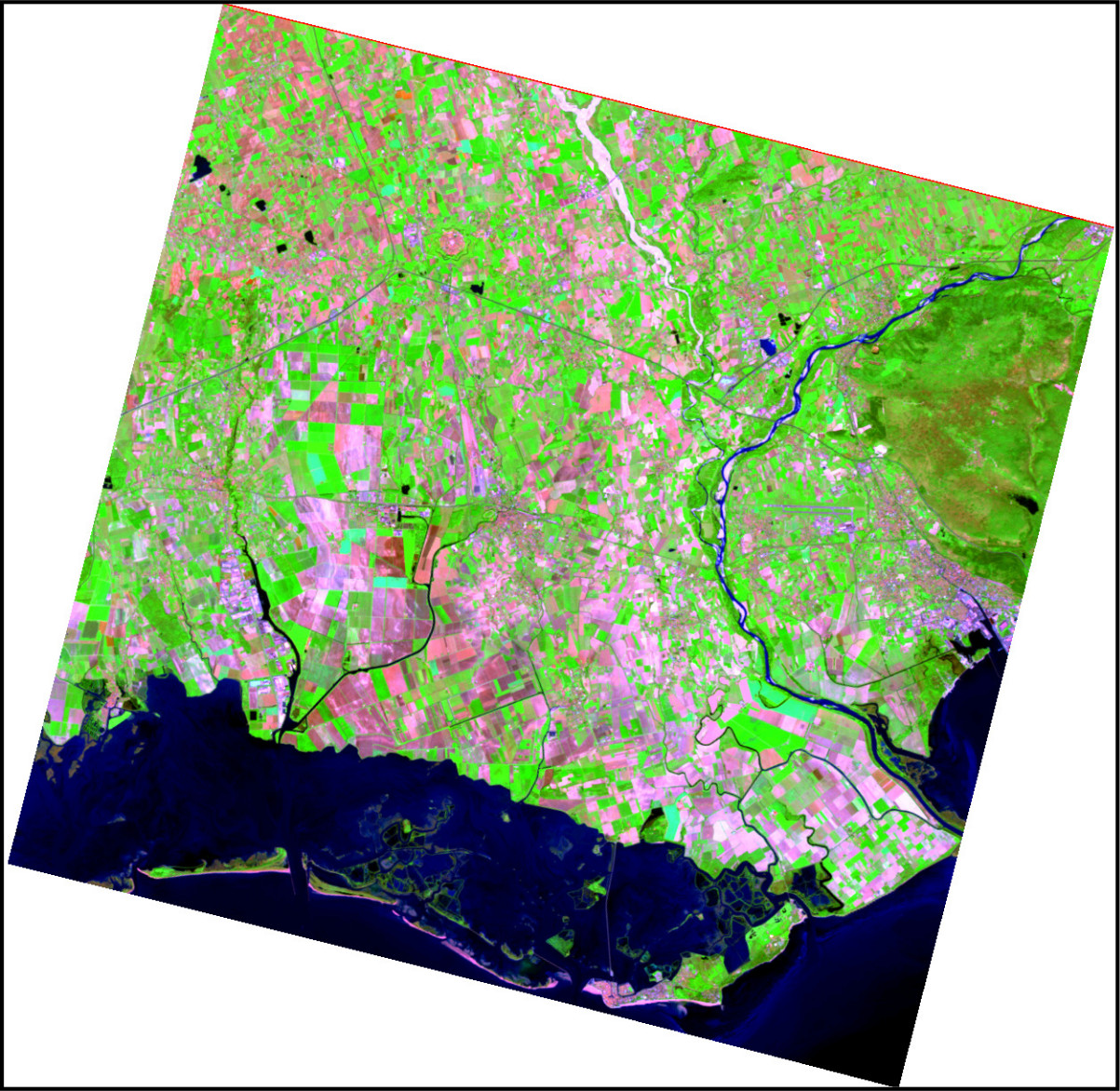
Figure: PRISMA SWIR-geology composite generated with i.hyper.import\
[Data source: PRISMA Product © Italian Space Agency (ASI), used under
ASI License to Use.]{.small}
:::
::::::::::
{width="600"
height="600" border="0"}\
Figure: PRISMA SWIR-geology composite generated with i.hyper.import\
[Data source: PRISMA Product © Italian Space Agency (ASI), used under
ASI License to Use.]{.small}
:::
::::::::::
::: code
# Import an EnMAP L2A product and create RGB and CIR composites
i.hyper.import input=/data/EnMAP_data_folder/ \
               product=enmap \
               output=enmap \
               composites='cir,swir_agriculture' \
               composites_custom='650,1650,2200'
:::
::::::: {align="center" style="margin: 10px"}
::: {align="center" style="margin: 10px"}
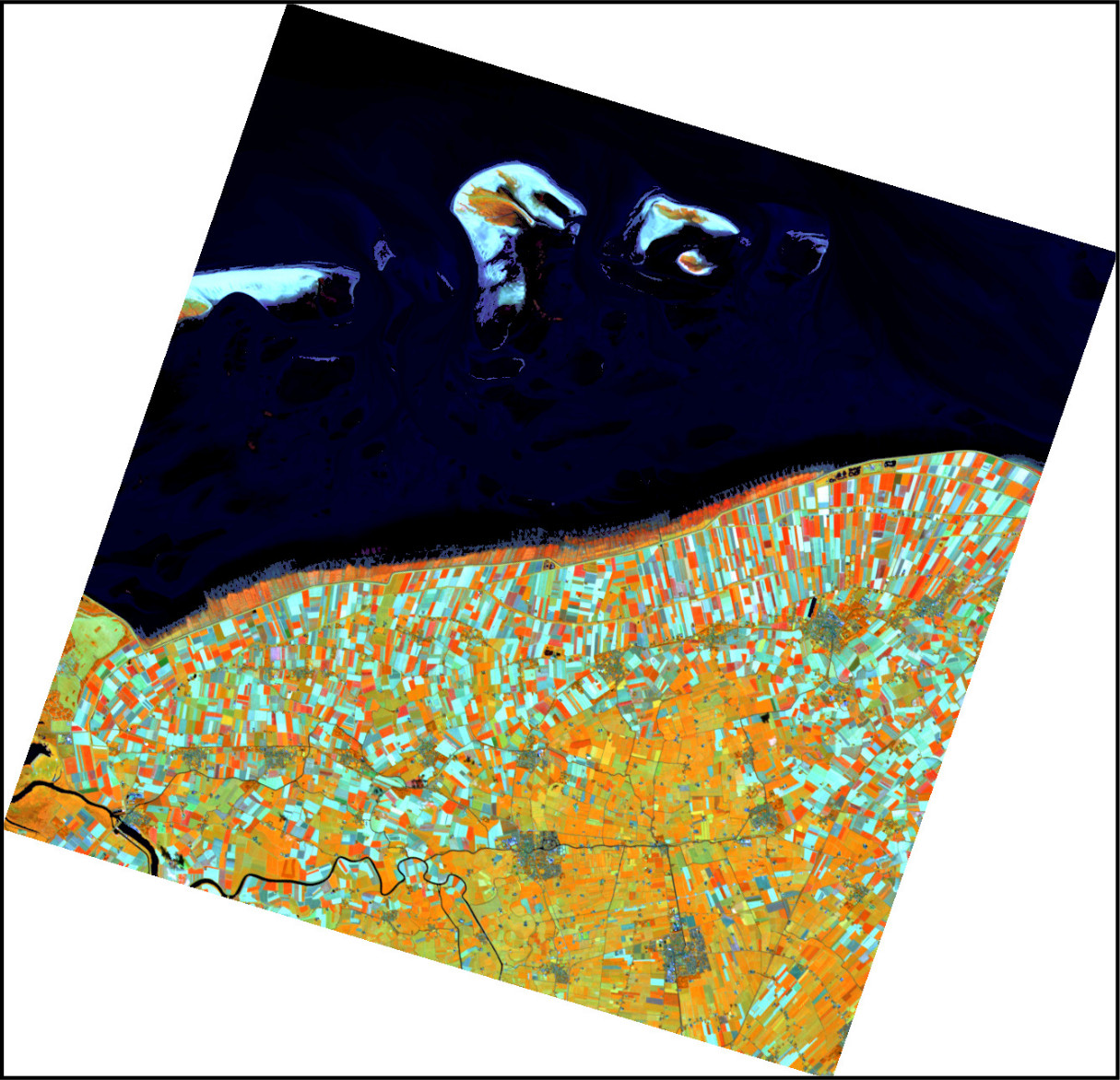 \
Figure: EnMAP SWIR-agriculture composite generated with
i.hyper.import\
[Data source: Copyright © 2012-2025 EnMAP at Earth Observation Center
EOC of DLR.]{.small}
:::
:::::::
\
Figure: EnMAP SWIR-agriculture composite generated with
i.hyper.import\
[Data source: Copyright © 2012-2025 EnMAP at Earth Observation Center
EOC of DLR.]{.small}
:::
:::::::
::: code
# Tanager BASIC radiance example
i.hyper.import input=/data/Tanager.h5 \
               product=tanager \
               output=tanager \
               composites='rgb'
:::
:::: {align="center" style="margin: 10px"}
::: {align="center" style="margin: 10px"}
 {width="600"
height="600" border="0"}\
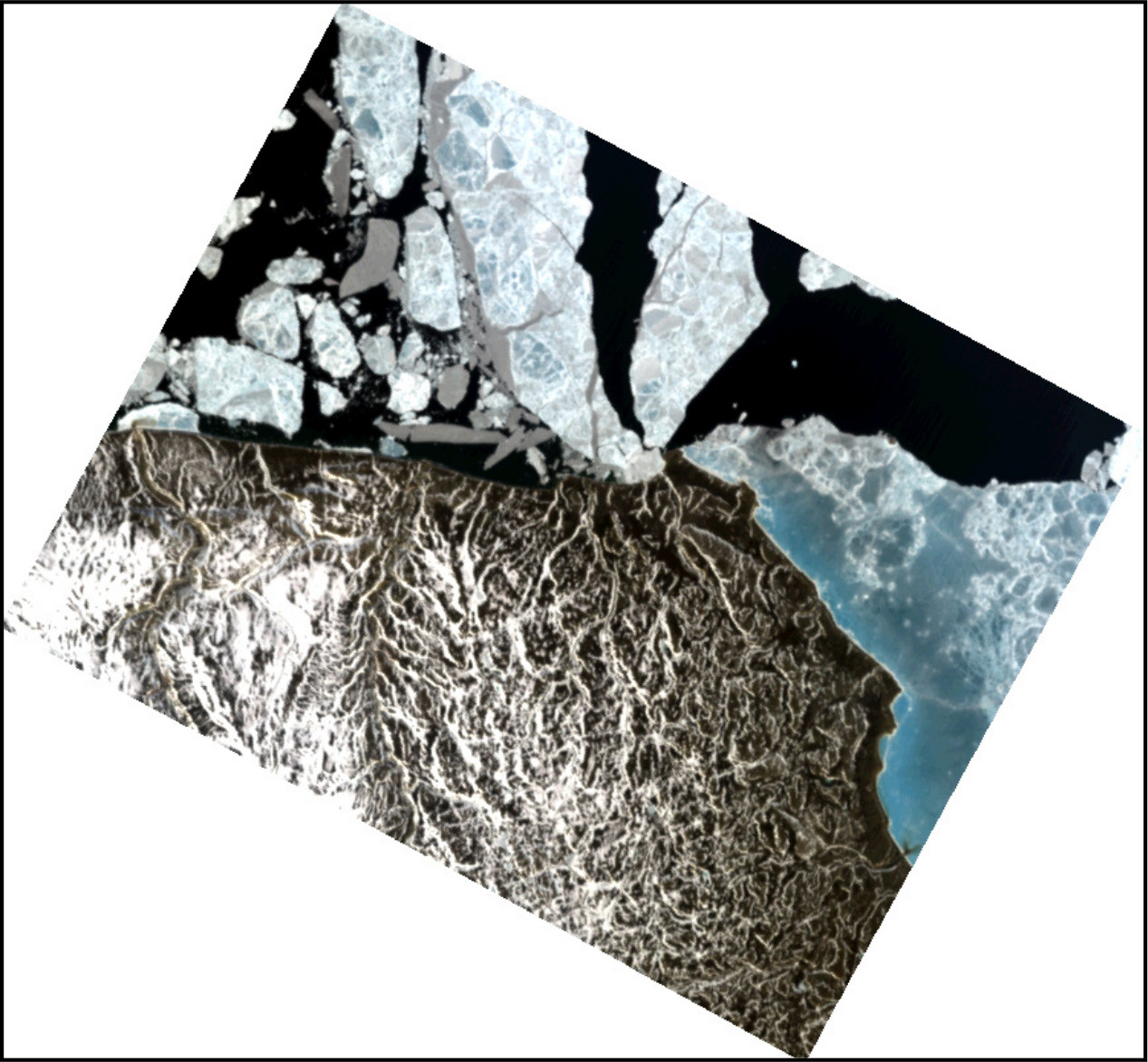
Figure: Tanager-1 RGB composite generated with i.hyper.import\
[Data source: Planet Labs - Open Data, CC-BY-4.0.]{.small}
:::
::::
{width="600"
height="600" border="0"}\
Figure: Tanager-1 RGB composite generated with i.hyper.import\
[Data source: Planet Labs - Open Data, CC-BY-4.0.]{.small}
:::
::::
::: code
# Restore a native hyperspectral archive into the current mapset
i.hyper.import input=/data/hyperspectral_data.ihyper \
               product=ihyper \
               output=ignored_name
:::
For native archive restore, the archived map name is restored as-is and
the output option is ignored.
SEE ALSO
EnMAP Example Data Products, Tanager Core Imagery, i.hyper.preproc, i.hyper.metadata, i.hyper.explore, i.hyper.composite, i.hyper.export, r3.stats, r3.univar
DEPENDENCIES
- NumPy -- Core numerical operations and array manipulation.
- h5py -- Interface for reading and writing
.h5(HDF5) hyperspectral data products such as PRISMA and Tanager. - pyproj -- Coordinate reference system and geospatial transformation library.
- Rasterio -- EnMAP raster and band metadata access.
- GDAL command-line tools --
gdalwarpfor EnMAP L1B north-up preprocessing. - SciPy -- Optional local geometric-gap filling for Tanager BASIC products.
AUTHORS
Alen Mangafić and Tomaž Žagar, Geodetic Institute of Slovenia
SOURCE CODE
Available at: i.hyper.import source code
(history)
Latest change: Wednesday Sep 16 14:49:52 2026 in commit 9b0a4cb