d.vect.chart
Displays charts of vector data in the active frame on the graphics monitor.
d.vect.chart [-clns3] map=name [type=string [,string,...]] [layer=string] [chart_type=string] columns=name [,name,...] [size_column=name] [size=integer] [scale=float] [outline_color=name] [colors=name [,name,...]] [max_ref=float [,float,...]] [legend_title=string] [legend_symbol_size=integer] [--verbose] [--quiet] [--qq] [--ui]
Example:
d.vect.chart map=name columns=name
grass.tools.Tools.d_vect_chart(map, type="point,line,boundary,centroid", layer="1", chart_type="pie", columns, size_column=None, size=40, scale=1, outline_color="black", colors="black", max_ref=None, legend_title=None, legend_symbol_size=20, flags=None, verbose=None, quiet=None, superquiet=None)
Example:
tools = Tools()
tools.d_vect_chart(map="name", columns="name")
This grass.tools API is experimental in version 8.5 and expected to be stable in version 8.6.
grass.script.run_command("d.vect.chart", map, type="point,line,boundary,centroid", layer="1", chart_type="pie", columns, size_column=None, size=40, scale=1, outline_color="black", colors="black", max_ref=None, legend_title=None, legend_symbol_size=20, flags=None, verbose=None, quiet=None, superquiet=None)
Example:
gs.run_command("d.vect.chart", map="name", columns="name")
Parameters
map=name [required]
Name of vector map
Or data source for direct OGR access
type=string [,string,...]
Input feature type
Allowed values: point, line, boundary, centroid, area
Default: point,line,boundary,centroid
layer=string
Layer number or name
Vector features can have category values in different layers. This number determines which layer to use. When used with direct OGR access this is the layer name.
Default: 1
chart_type=string
Chart type
Allowed values: pie, bar
Default: pie
columns=name [,name,...] [required]
Attribute columns containing data
size_column=name
Column used for pie chart size
size=integer
Size of chart (diameter for pie, total width for bar)
Default: 40
scale=float
Scale for size (to get size in pixels)
Default: 1
outline_color=name
Outline color
Either a standard color name or R:G:B triplet
Default: black
colors=name [,name,...]
Colors used to fill charts
Either a standard color name or R:G:B triplet
Default: black
max_ref=float [,float,...]
Maximum value used for bar plot reference
legend_title=string
Legend title
legend_symbol_size=integer
Legend symbol size
Default: 20
-c
Center the bar chart around a data point
-l
Create legend information and send to stdout
-n
Do not draw map, only output the legend information
-s
Do not show this layer in vector legend
-3
Create 3D charts
--help
Print usage summary
--verbose
Verbose module output
--quiet
Quiet module output
--qq
Very quiet module output
--ui
Force launching GUI dialog
map : str, required
Name of vector map
Or data source for direct OGR access
Used as: input, vector, name
type : str | list[str], optional
Input feature type
Allowed values: point, line, boundary, centroid, area
Default: point,line,boundary,centroid
layer : str, optional
Layer number or name
Vector features can have category values in different layers. This number determines which layer to use. When used with direct OGR access this is the layer name.
Used as: input, layer
Default: 1
chart_type : str, optional
Chart type
Allowed values: pie, bar
Default: pie
columns : str | list[str], required
Attribute columns containing data
Used as: input, dbcolumn, name
size_column : str, optional
Column used for pie chart size
Used as: input, dbcolumn, name
size : int, optional
Size of chart (diameter for pie, total width for bar)
Default: 40
scale : float, optional
Scale for size (to get size in pixels)
Default: 1
outline_color : str, optional
Outline color
Either a standard color name or R:G:B triplet
Used as: input, color, name
Default: black
colors : str | list[str], optional
Colors used to fill charts
Either a standard color name or R:G:B triplet
Used as: input, color, name
Default: black
max_ref : float | list[float] | str, optional
Maximum value used for bar plot reference
legend_title : str, optional
Legend title
legend_symbol_size : int, optional
Legend symbol size
Default: 20
flags : str, optional
Allowed values: c, l, n, s, 3
c
Center the bar chart around a data point
l
Create legend information and send to stdout
n
Do not draw map, only output the legend information
s
Do not show this layer in vector legend
3
Create 3D charts
verbose : bool, optional
Verbose module output
Default: None
quiet : bool, optional
Quiet module output
Default: None
superquiet : bool, optional
Very quiet module output
Default: None
Returns:
result : grass.tools.support.ToolResult | None
If the tool produces text as standard output, a ToolResult object will be returned. Otherwise, None will be returned.
Raises:
grass.tools.ToolError: When the tool ended with an error.
map : str, required
Name of vector map
Or data source for direct OGR access
Used as: input, vector, name
type : str | list[str], optional
Input feature type
Allowed values: point, line, boundary, centroid, area
Default: point,line,boundary,centroid
layer : str, optional
Layer number or name
Vector features can have category values in different layers. This number determines which layer to use. When used with direct OGR access this is the layer name.
Used as: input, layer
Default: 1
chart_type : str, optional
Chart type
Allowed values: pie, bar
Default: pie
columns : str | list[str], required
Attribute columns containing data
Used as: input, dbcolumn, name
size_column : str, optional
Column used for pie chart size
Used as: input, dbcolumn, name
size : int, optional
Size of chart (diameter for pie, total width for bar)
Default: 40
scale : float, optional
Scale for size (to get size in pixels)
Default: 1
outline_color : str, optional
Outline color
Either a standard color name or R:G:B triplet
Used as: input, color, name
Default: black
colors : str | list[str], optional
Colors used to fill charts
Either a standard color name or R:G:B triplet
Used as: input, color, name
Default: black
max_ref : float | list[float] | str, optional
Maximum value used for bar plot reference
legend_title : str, optional
Legend title
legend_symbol_size : int, optional
Legend symbol size
Default: 20
flags : str, optional
Allowed values: c, l, n, s, 3
c
Center the bar chart around a data point
l
Create legend information and send to stdout
n
Do not draw map, only output the legend information
s
Do not show this layer in vector legend
3
Create 3D charts
verbose : bool, optional
Verbose module output
Default: None
quiet : bool, optional
Quiet module output
Default: None
superquiet : bool, optional
Very quiet module output
Default: None
DESCRIPTION
d.vect.chart displays charts for GRASS vector data in the active frame on the graphics monitor.
NOTES
The charts are positioned as follows:
- vector points: on point position,
- vector lines: on line centers,
- vector areas: on area centroids.
Bar charts are placed with their lower edge starting from the y-coordinate of the feature being symbolized, and centered with respect to the x-coordinate. The -c flag can be used to center the bar chart in both x and y directions.
The 'sizecol' parameter is proportionate to the radius.
The optional max_ref parameter accepts a list of values that represent the maximum value for each column listed in the values for the parameter columns. These values are used to create a framed bar plot if chart_type is bar (See Example 2).
EXAMPLES
Example 1
Pie-charts showing the proportion of different types of firefighting equipment available at fire stations (North Carolina sample dataset). The types of equipment are listed in different columns of the firestations attribute table. The sum of these columns can be used for the size of a pie chart, reflecting the total equipment inventory. Example adapted from Making Thematic Maps tutorial.
# open a graphical display
d.mon wx0

# draw streets
d.vect -s map=streets_wake color=#d6d6d6

# draw pie-charts and specify legend title
d.vect.chart -c map=firestations
    columns=PUMPERS,TANKER,PUMPER_TAN,MINI_PUMPE \
    size_column="PUMPERS+TANKER+PUMPER_TAN+MINI_PUMPE" \
    scale=8 outline_color=white \
    colors="#00cb85,#537eff,#efe645,#e935a1" \
    legend_title="Firefighting equipment"

# and finally draw legend
d.legend.vect at=70,25
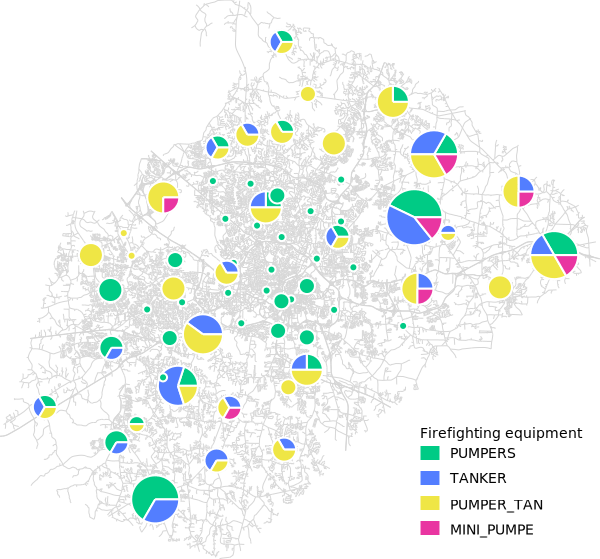
Proportion of different types of firefighting equipment
Example 2
Pie-charts of monthly winter precipitation (North Carolina sample dataset):
g.region vector=nc_state -p
d.vect nc_state
d.vect.chart precip_30ynormals chart_type=pie columns=nov,dec,jan,feb -l

# show pie chart as 3D
d.erase
d.vect nc_state
d.vect.chart precip_30ynormals chart_type=pie columns=nov,dec,jan,feb -l -3
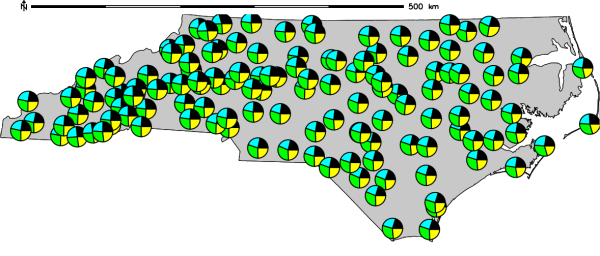
2D pie-chart of monthly winter precipitation in North Carolina
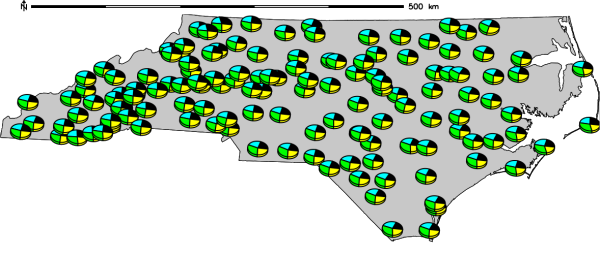
3D pie-chart of monthly winter precipitation in North Carolina
Example 3
Bar-chart of different census map values:
d.vect.chart map=vectmap columns=cens51,cens61,cens71,cens81 chart_type=bar
Example 4
Creation of framed bar charts of an erodibiliy index from the Spearfish sample dataset:
g.region raster=erode.index -p
r.to.vect -s input=erode.index output=erode_index type=area
v.extract input=erode_index output=erode_index_ctrds type=centroid
d.rast aspect
d.vect.chart map=erode_index_ctrds chart_type=bar columns=cat \
             size=10 max_ref=12 scale=0.05 colors=yellow
d.vect erode_index_ctrds icon=basic/circle fcol=black col=black size=5
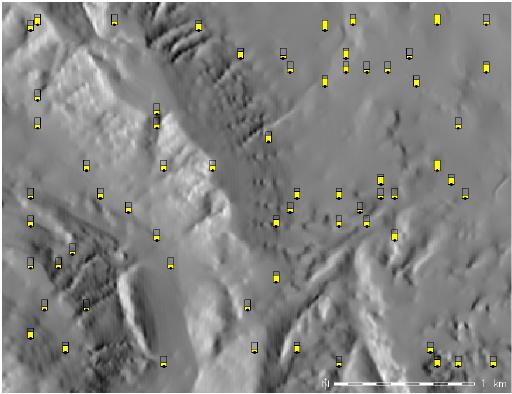
Bar charts of an erodibiliy index (spatial subset)
SEE ALSO
d.erase, d.vect, d.legend.vect, d.vect.thematic, d.what.vect, d.rast
AUTHOR
Radim Blazek, ITC-Irst, Trento, Italy
SOURCE CODE
Available at: d.vect.chart source code
(history)
Latest change: Wednesday Sep 02 22:25:59 2026 in commit ba172cd